
Your team, with one more coworker.
AI coworkers built around the way your company works: connected to your people, processes and business tools, and set up by our team.
AI agents for business, in Slack, Teams, WhatsApp, Telegram and the web.
Laura MendezCEO
Can I have the weekly summary before the 9:00?

Management coworkerHubMates
Here it is, in your template: sales, projects and the two decisions that need you this week.
Weekly-summary-wk10.docxDOCXLaura MendezCEO
Perfect. Same time every Monday, please.
Management coworkerHubMates
Done. It'll be here every Monday at 8:00.
Illustrative example
Our team has delivered AI solutions for



Pick your team. See what your coworker does on Monday morning.
AI is already in use, but scattered. Everyone has their own chat, nothing is shared and nobody knows what it can reach.
AI becomes a company resource. Coworkers with clear responsibilities, set up once and shared with the people who need them.
- Weekly management report in your template
- Decisions that need you, flagged
- Shared with the right people, each with their own access
Management coworkerHubMates
Good morning. The weekly management report is ready: sales by line, open projects and the two decisions waiting on you.
Management-report-wk10.pdfPDFLaura MendezCEO
Great. Add it to the 9:00 agenda and share it with Finance.
Management coworkerHubMates
Shared with Finance. They see the report, not your inbox.
Illustrative example · Teams
Your reps lose hours preparing meetings, briefs and follow-ups from information spread across the CRM and email.
A sales coworker prepares the account brief, drafts the follow-up and delivers the weekly pipeline, with your methodology and templates.
- Account brief before the meeting
- Follow-up draft after the call
- Weekly pipeline summary
Marco RuizAccount executive
Can you prep me for the 11:00 with Brightline?
Sales coworkerHubMates
Your account brief is ready, built from HubSpot and your last six emails with them. A follow-up draft is waiting for after the call.
Brightline-account-brief.docxDOCX
Illustrative example · Slack
Project status, pending work and recurring reports that someone builds by hand every week.
Scheduled responsibilities: a daily briefing, a pending-work check, the weekly summary and the monthly report in Word, PDF or Excel.
- Weekly status with owners tagged
- Follow-up notes drafted for your review
- Monthly report on schedule
Operations coworkerHubMates
Weekly status is in. 14 projects: 11 on track, 2 waiting on a client, 1 blocked on purchasing. Owners are tagged in the sheet.
Weekly-status-wk10.xlsxXLSXDiego PereiraOperations lead
Thanks. Can you chase purchasing for me?
Operations coworkerHubMates
Drafted the note to purchasing. It's in your drafts for review.
Illustrative example · Teams
You worry about access nobody controls, data getting mixed and one more platform to maintain.
Explicit permissions for each person and each coworker, a separate administration, and a managed service or a deployment in your own infrastructure.
- Who uses each coworker, with which access
- Access changes, reviewed
- Managed service or your own infrastructure
Admin coworkerHubMates
Monthly access review: the Sales coworker serves 8 people, each through their own CRM account. Two access changes this month, both approved.
Access-review-oct.pdfPDFSam KellerIT manager
Good. Remove the intern's access on Friday.
Admin coworkerHubMates
Scheduled for Friday. You'll get a confirmation when it's done.
Illustrative example · Teams
Your clients want applied AI, and building every solution from scratch doesn't scale.
A common foundation with reusable packs and integrations for each client, and our team behind you.
- One pack, reused across clients
- Each client's data kept to that client
- Our team as your backup
Reporting coworkerHubMates
Monthly reports for all three clients are ready. Same pack, each client's own data and template.
Client-B-monthly-oct.pdfPDFAlex TurnerPartner
Send Client B's to me first. They changed their KPIs.
Reporting coworkerHubMates
Sent. I've noted the new KPIs for next month's report too.
Illustrative example · Slack
One for you. One for your function. One for your team.
Personal coworker
Helps one person prepare, research, organize and follow up, with that person's own accounts.
Specialized coworker
Owns a responsibility: sales preparation, marketing analysis, operations or corporate reporting.
Team coworker
Supports an approved group with shared processes and reference knowledge, while each member keeps their own access.
A person can work with several specialists, and a specialist can support many people.
Configured once
- MethodYour sales methodology
- CriteriaQualification criteria
- TemplateProposal template v2
- CRMHubSpot connection
Sales coworker
Each with their own access
- Marco RuizAccount executiveOwn CRMTemplate v2
- Ana LópezAccount executiveOwn CRMTemplate v2
- Priya ShahSales managerOwn CRMTemplate v2
- Tom BeckerSDROwn CRMTemplate v2
- Lucía GómezAccount executiveOwn CRMTemplate v2
Illustrative example
One setup for the team. Each person keeps their own accounts and access.
Ask where you already work.
Ask in Slack, Microsoft Teams, WhatsApp, Telegram or the web, and get the result where you are. Your company chooses which channels to turn on, and turning one on doesn't automatically give it access to your data.
- Slack
- Microsoft Teams
- Telegram
- Web
Built around the tools you already use.
Google Workspace, Microsoft 365, Salesforce, HubSpot, Jira, Asana, Trello, Notion and Confluence, plus an ecosystem of 1,000+ business apps. You choose the connections, the accounts and what the coworker is allowed to do with each one.
- Google Workspace
- Microsoft 365
- Salesforce
- HubSpot
- Jira
- Asana
- Trello
- Notion
- Confluence
- + 1,000 business apps
Real deliverables, not chat answers.
Briefs, proposals, meeting materials and management reports in Word, PDF and Excel, in your templates and ready for review.
Word
Account briefs · Proposals · Meeting prep
PDF
Management reports · Information pulled from the PDFs you already have
Excel
Pipeline summaries · Project status · Tables and charts
Illustrative example
It remembers. And it keeps working when you're not there.
It remembers your preferences, decisions and project context, so you don't repeat the background every time. You decide what it keeps, and what stays personal or within a project.
It runs research and analysis in the background and delivers the daily briefing, the weekly summary or the monthly report on schedule, to the people you choose.
Scheduled
- Weekdays · 8:00Daily briefing
- Mondays · 8:00Weekly summary
- 1st of the month · 9:00Monthly management report
- In the backgroundMarket research, ready for review
Expertise, packaged by function.
Packs for sales, marketing, operations, finance, HR and customer support, adapted to your vocabulary and processes. Adding a pack doesn't automatically add access.
- Sales
- Marketing
- Operations
- Finance
- HR
- Customer support
A sales pack, for example, brings together
- Account research
- Call preparation
- Opportunity summaries
- Follow-up drafts
Your access stays yours.
- Sharing a coworker doesn't share your accounts, private conversations or confidential data.
- Each person works with the information and actions they're authorized to use.
- Reports follow the same permissions as everyday work, with human review where your business needs it.
- Run it as a managed service, or deployed in your own infrastructure with our team's support.
How we start.
Define the role.
Choose the responsibility, the people it supports and the result they expect.
Connect your tools.
Pick the apps and channels, authorize accounts and set what information and actions are allowed.
Configure the coworker.
Instructions, skills, packs, memory, templates and scheduled work.
Validate and expand.
Review real outputs with your team, refine, and extend to more people or workflows.
Need something only your company has?
- Your ERP
- An approval flow
- Your own report format
Your ERP, an approval flow or your own report format: we build it into your coworker. Our team handles setup, integrations, validation and ongoing support, so your people can focus on the work.
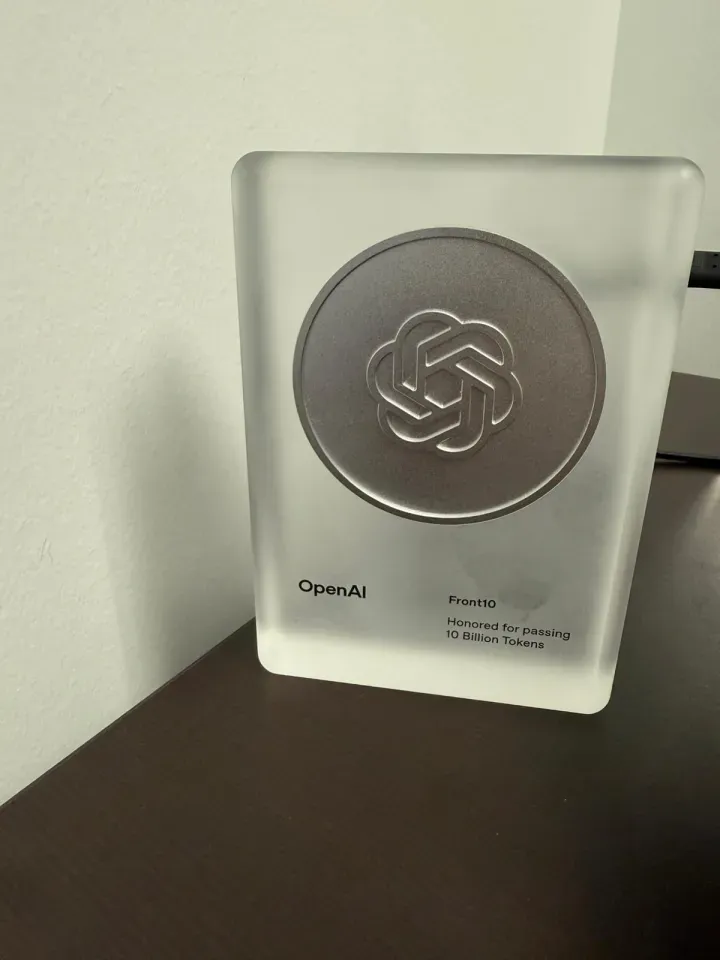
A team that has done this before.
HubMates is built and operated by Front10, a team recognized by OpenAI for passing 10 billion tokens and the creators of WOXO AI. Teams in Miami, Cancún and Montevideo, working in English and Spanish.
- Miami
- Cancún
- Montevideo
Questions leaders ask us.
Why not just ChatGPT or Copilot?
They're powerful tools. HubMates turns that power into a capability your company shares, maintains and grows: connected to your tools, with clear permissions and set up around your work. And our team does the setup and the upkeep.
What can a coworker do in my company?
It takes a recurring responsibility: preparing account briefs, chasing pending work, producing the weekly summary or the monthly report. Start with one that matters and expand from there.
Do I have to change my tools?
No. Coworkers connect to the systems your teams already use and work in the channels you already have. Which actions are available depends on each app and on your accounts with it.
Can other people see my accounts or conversations?
No. Each person uses a shared coworker with their own access, and what's personal stays personal. Sharing your accounts or conversations is a separate decision, made explicitly.
Can it run in our own infrastructure?
Yes, on compatible infrastructure. Our team delivers a dedicated installation and agrees the requirements for access, integrations, security and operation with you.
How is it priced?
Per implementation. Platform, usage, integrations and support depend on what your coworkers do, so we quote after we understand your case.
Which languages do you work in, and where are you?
English and Spanish. Our teams are in Miami, Cancún and Montevideo, and we work with companies online.
Start with a recurring responsibility that matters.
Tell us what you'd like your first coworker to do, and we'll show you how HubMates works.
Request a demo
Tell us about your company and the work you'd like a coworker to take on. Our team reviews every request.